

You open your email and see the news no business owner wants: Google Business Profile suspended. Your listing is gone from Google Maps, your reviews have disappeared from view, and the phone has gone quiet.
For a local business in Australia, that is not a small problem. Your Business Profile is often the first thing a customer sees before they call you.
The good news: a suspension is not always permanent. Google runs an official appeal process, and many suspensions come down to fixable issues. This guide explains, step by step and based on Google’s own rules, why profiles get suspended, what Australian businesses get wrong, and how to submit an appeal that gives you the best chance.
Quick answer: what to do if your profile is suspended
In short:
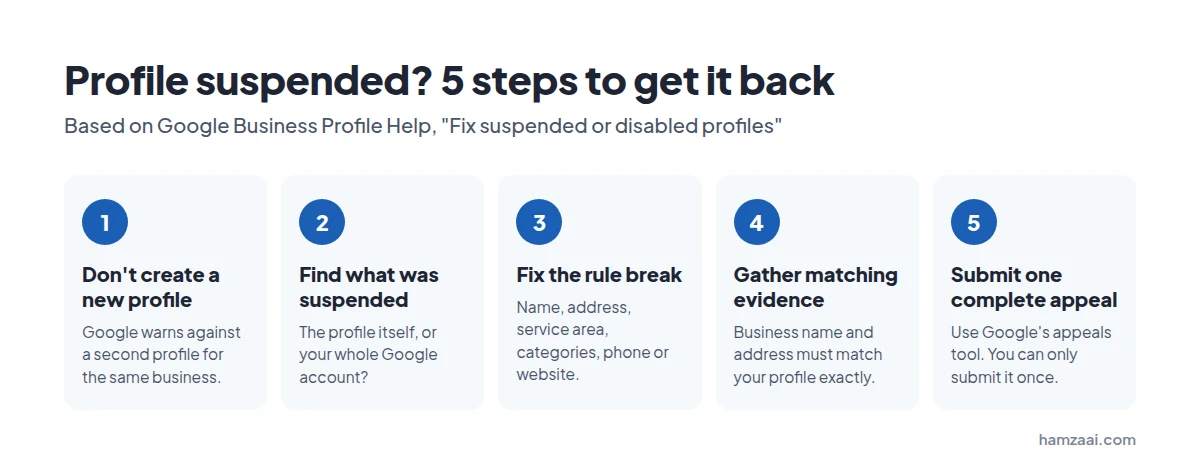
- Don’t create a new profile for the same business. Google warns against it.
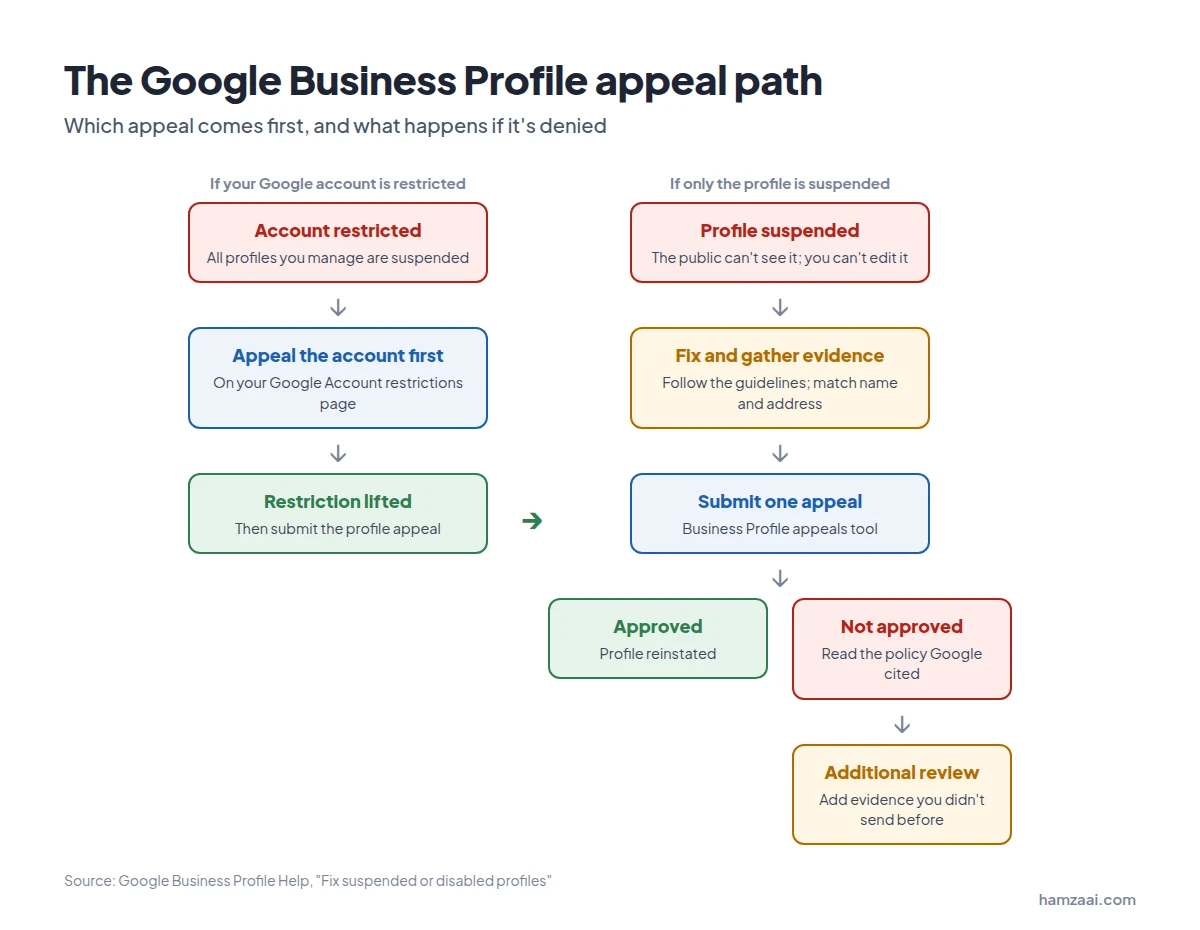
- Find out exactly what was suspended: the profile itself, or your whole Google account.
- Fix whatever breaks Google’s guidelines: name, address, service area, categories, phone or website.
- Gather evidence where the business name and address match your profile exactly, such as your ASIC business name record and a utility bill.
- Submit one complete appeal through Google’s Business Profile appeals tool. You only get to submit it once.
The rest of this guide walks through each step in detail.
Step 1: Work out what has actually been suspended
Before you fix anything, find out what Google took action on. The fix depends on it, and appealing the wrong thing wastes your one appeal.
| What happened | What it means | Where to fix it |
|---|---|---|
| Your Business Profile was removed | The public can’t see the profile, and owners and managers can’t act on it. | Appeal the profile in the Business Profile appeals tool. |
| Your Google account was restricted | Every Business Profile you manage is suspended, and you can’t create or claim new ones. | Appeal the account first on your Google Account restrictions page, then appeal the profile. |
| The owner’s Google account was removed | Google removes all locations owned by that account. | Get the owner’s account reinstated. The locations come back with it. |
| A manager’s Google account was removed | Only that manager loses access. The locations are not affected. | The owner keeps managing. The manager appeals their own account. |
Source: Google Business Profile Help, Fix suspended or disabled profiles.
Tip: The order matters with account restrictions. Google says that once the account restriction is lifted, you can then submit an appeal for the Business Profile.
Why Google suspends Business Profiles
Google says it may suspend or disable profiles that don’t follow its guidelines. To keep a profile live, a business must avoid prohibited content, represent itself accurately, and follow Google’s product guidelines.
These are the most common rule breaks, taken directly from Google’s Guidelines for representing your business on Google.
1. Extra words in the business name
Your profile name must match your real-world name, as used on your signage, website and stationery. Google states that adding unnecessary information to the name isn’t permitted and could result in suspension.
That means no:
- Keywords or services (“Smith Plumbing Emergency Plumber Sydney“)
- Locations (“Smith Plumbing Parramatta“, unless that is truly your branded name)
- Marketing taglines, phone numbers or website addresses
- Opening hours (“Open 24 Hours“)
- Fully capitalised words (“SMITH PLUMBING”)
- Legal terms such as Ltd, unless you can prove you use them in the real world (more on this below)
2. An address that isn’t a real, staffed location
- P.O. boxes and remote mailboxes are not accepted.
- Virtual offices are not eligible. If you rent a mailing address but don’t operate from it, it can’t have a profile.
- Co-working spaces only qualify if your office has clear signage, receives customers during business hours, and is staffed by your own team.
- If you show your address, Google expects permanent signage with your business name at that location.
3. Duplicate profiles
Google allows one profile per location, whether in one account or several. A second profile for the same business is a common trigger.
4. A service area that’s too big
Service-area businesses get one profile, based where they operate from. Google says the overall service area shouldn’t extend farther than about two hours of driving time from that base.
5. Phone numbers and websites that redirect
Your phone number must be under your direct control. Numbers or URLs that redirect customers to someone else’s landing page or phone number aren’t allowed, and premium-rate numbers are never acceptable.
6. Categories used as keywords
Google asks you to choose the fewest categories that describe your core business. Use categories that complete the sentence “This business is a…”, not “This business has a…”. Categories added only as keywords break the rules.
The Australian traps most guides miss
Most suspension guides are written for American businesses. Australian businesses run into a few problems of their own, and they are easy to miss.
Trap 1: “Pty Ltd” in your profile name
Many Australian companies add “Pty Ltd” to their Google profile because it is their legal name. Google’s guidelines list irrelevant legal terms (such as LLC, LTD and INC) as something your name must not include.
There is one exception. You can include a legal term if you can provide real-world proof, such as signage, business cards or invoices, that consistently shows it as part of your business name.
| Profile name | Is it OK? |
|---|---|
| Smith Plumbing Pty Ltd | Only if your signage, cards and invoices all show “Pty Ltd” |
| Smith Plumbing | Yes, if that is the name customers see |
| Smith Plumbing Pty Ltd – Best Plumber Sydney | No. Keywords and location stuffing |
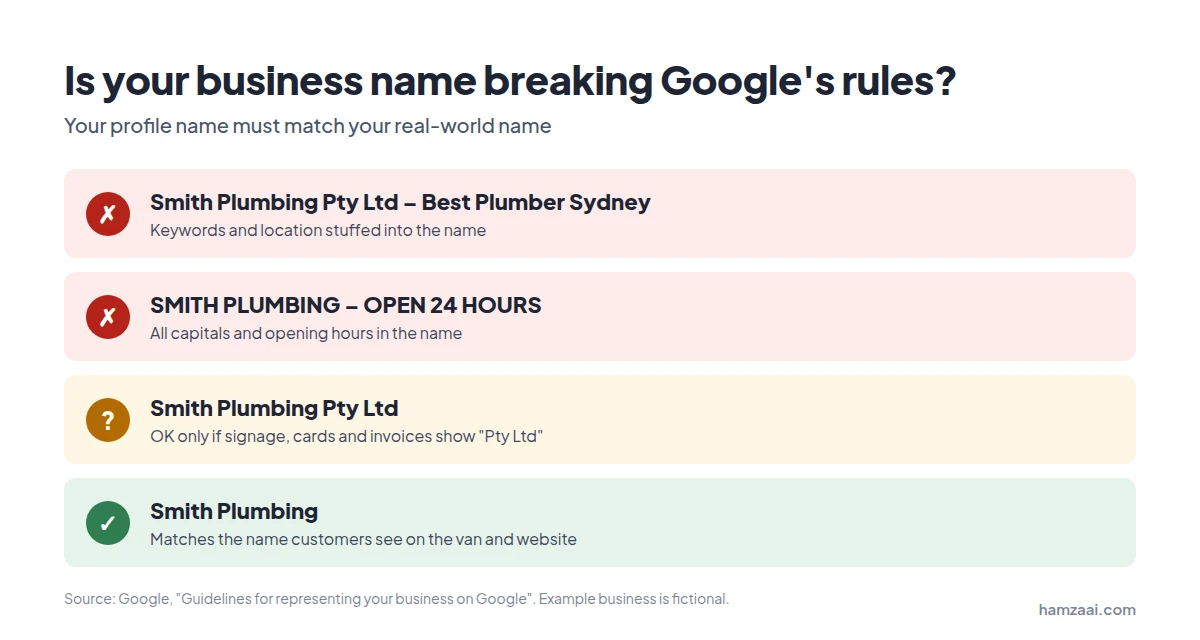
Rule of thumb: use the name your customers actually see on your van, shopfront and website.
Trap 2: Your profile name doesn’t match your registered names
When you appeal, Google wants documents where the business name matches your profile. So check what is on record before you appeal:
- ABN Lookup (Australian Business Register) shows the entity name and business names linked to an ABN.
- ASIC’s Business Names Register shows registered business names. ASIC manages all business name registrations.
If you trade under a name that isn’t registered anywhere, you may struggle to prove it. The ABR notes that businesses not operating under their own names must register their business name on the national Business Names Register.
Note: Business names registered before 28 May 2012 may not show in ABN Lookup. The ABR says you can add your ABN to your business name record with ASIC to show the link. (ABR business names FAQ)
Trap 3: Home-based tradies showing their home address
If you’re a plumber, electrician or cleaner who works from home and travels to customers, you’re a service-area business. Google’s own example is a plumber running the business from a residential address, who should clear the address from the profile.
Showing a home address that customers can’t visit, without signage or opening hours, goes against Google’s guidance. Set your service area instead, and hide the address.
Step 2: Fix the problem before you appeal
Google’s first instruction is simple: before you submit an appeal, make sure your profile follows all the guidelines. An appeal for a profile that still breaks the rules is unlikely to succeed.
Go through this checklist and fix everything you can.
Business name
- ☐ Matches your signage, website, invoices and business cards exactly
- ☐ No keywords, suburbs, taglines, phone numbers or opening hours
- ☐ “Pty Ltd” removed, unless you can prove you use it in the real world
- ☐ Matches the name on your ASIC or ABN records (or you can show how they connect)
Address and service area
- ☐ A real address where you operate, not a P.O. box or virtual office
- ☐ Permanent signage at the address, if the address is shown publicly
- ☐ Home address hidden if customers don’t visit you
- ☐ Service area within roughly two hours’ drive of your base
Profiles and contact details
- ☐ Only one profile for this business location
- ☐ Phone number is under your direct control, with no call-tracking redirect to another business
- ☐ Website link goes to your own business, not a third-party page
Categories and content
- ☐ Primary category describes what your business is
- ☐ No extra categories added just as keywords
- ☐ Business description has no links, prices or promotions
Important: if your profile shows as suspended, you may not be able to edit it. In that case, note what needs fixing on your website and other listings now, and explain the fix in your appeal.
Step 3: Gather evidence that proves your business is real
Evidence is optional in Google’s appeals tool, but it can strengthen your appeal. Google lists these types of evidence:
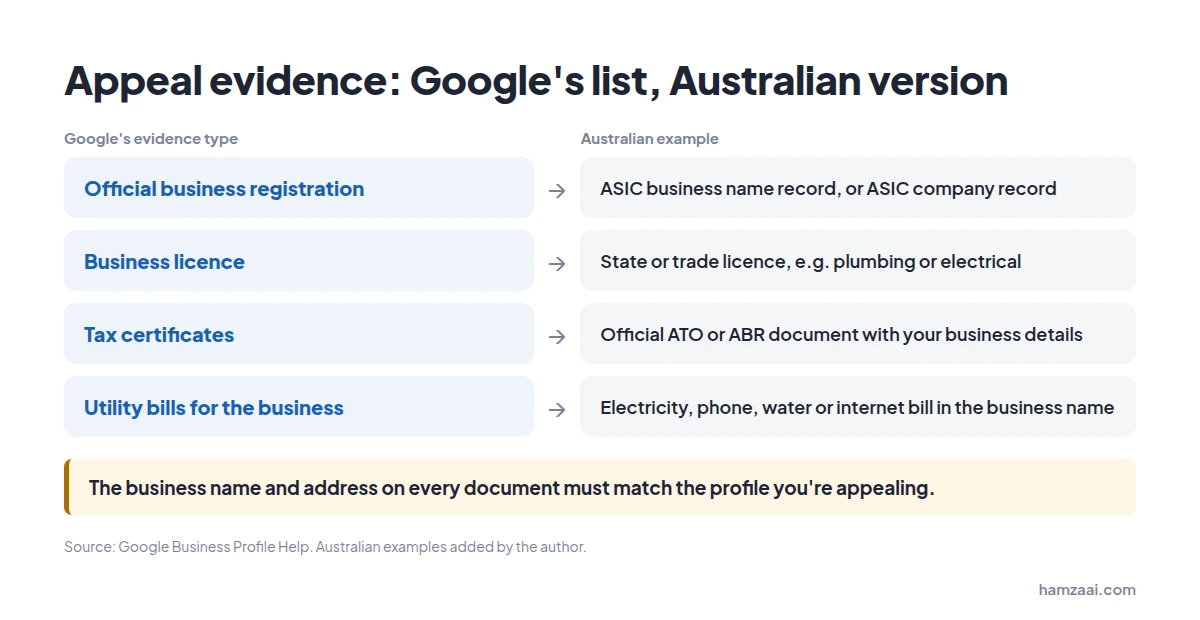
| Google’s evidence type | Australian example |
|---|---|
| Official business registration | ASIC business name registration record, or ASIC company record for a Pty Ltd |
| Business licence | State or trade licence (for example, a plumbing or electrical licence) |
| Tax certificates | An official document from the ATO or ABR showing your business details |
| Utility bills for the business | Electricity, phone, water or internet bill in the business name |
Source: Google Business Profile Help. Australian examples added by the author.
The one rule that matters most
Google’s tip is clear: the business name and address on every document must match the profile you’re appealing.
This is an easy mistake to make. A bill addressed to “J Smith” at a home address won’t help a profile called “Smith Plumbing” at a shop address.
Before you upload, check each document:
- Is the business name the same as on your profile?
- Is the address the same, down to the unit number?
- Is the document recent and easy to read?
Step 4: Submit your appeal (step by step)
Warning: Google says do not create a new Business Profile for the same business. And appeals can only be submitted once, so have your fixes and evidence ready before you start.
These are the official steps from Google Business Profile Help:
- Open the Google Business Profile appeals tool.
- If you’re signed in to the Google account linked to the profile, select Confirm. Otherwise, select Switch account.
- Select the Business Profile you want to appeal, then Continue.
- Select the decision you want to appeal, then Continue. The tool shows the date of the decision, the reason, a link to the policy that was broken, and whether the decision can be appealed.
- Add your supporting evidence with Choose file. You can attach several files.
- Use the text box to explain why your profile should be reinstated.
- Tick the box confirming all evidence is attached, then select Submit appeal.
Google then reviews the appeal and emails you its decision.
Read the policy link carefully
Step 4 is the most useful part of the process. The tool tells you which policy Google says you broke. Your explanation and your fixes should answer that exact policy, not a guess.
Sample appeal statement
Keep your explanation short, factual and honest. Edit this template to match your situation:
Our business, [Business Name], is a [type of business] operating from [address / serving customers across suburbs].
We have reviewed our profile against the Guidelines for representing your business on Google. We have [describe fixes, e.g. removed “Pty Ltd – Emergency Plumber” from our name so it matches our signage and invoices / hidden our home address and set our service area].
We have attached our [ASIC business name record / utility bill / licence], which shows our business name and address matching this profile.
We ask that you review and reinstate our profile.
Track your appeal
In the same appeals tool, select your profile to see its status: Submitted, Approved, Not Approved, Can’t be appealed, or Eligible for appeal.
Profile suspended and not sure where to start?
You only get one appeal, so it pays to get it right the first time. I’m Hamza Iftikhar, a Local SEO Specialist working with Australian businesses. I can:
- Audit your profile against Google’s current guidelines
- Find the likely cause of the suspension
- Fix your name, address, service area and categories where needed
- Prepare matching evidence and a clear, well-documented appeal
Google makes the final decision, so no one can honestly guarantee reinstatement. What I can promise is a careful, guideline-compliant appeal that gives you the best possible chance.
Book a free call or email hamza@hamzaai.com
What if your appeal is denied?
A “Not Approved” decision is not always the end. Google says that only if your reinstatement request is denied, it may be able to do an additional review. You can submit this through Google’s additional review form, and you can include evidence you didn’t add to your original appeal.
Before you use it:
- Reread the policy Google cited in its decision.
- Check whether anything on your profile, website or documents still doesn’t match.
- Gather stronger evidence, such as a registration record if you only sent a bill the first time.
Appealing more than 10 locations
If you manage more than 10 suspended profiles, Google offers a bulk process. When you start an appeal in the appeals tool, it asks: “Are you requesting bulk reinstatement for 10 or more suspended locations?”
Select Yes, then attach:
- A spreadsheet with the Business Profile ID of each suspended location
- Supporting documents, such as business registration, licences, tax certificates or utility bills
Google stresses that the business name and address on each document must exactly match your registration. Note that the tool only updates the status of the profile you selected, and you’ll receive one decision email for it.
Reviews: two sets of rules Australian businesses must follow
Reviews are where many businesses take risks without realising it. In Australia, you need to follow both Google’s policy and Australian Consumer Law, and Google’s rules are the stricter of the two.
| Practice | Google’s policy | Australian Consumer Law (ACCC) |
|---|---|---|
| Offering a discount or freebie for a review | Not allowed. Incentivised reviews are removed. | Allowed only if the incentive applies equally to positive and negative reviews and is prominently disclosed. |
| Asking only happy customers for reviews | Not allowed. No selectively soliciting positive reviews. | Can mislead consumers about your business. |
| Asking family, friends or staff to review | Must reflect a genuine experience. | They must prominently disclose their connection to your business. |
| Offering something to remove a negative review | Not allowed. | Can be misleading conduct. |
| Pressuring customers to review on the spot | Not allowed while on the premises. | — |
Sources: Google’s Prohibited & restricted content policy and the ACCC’s Online reviews must be genuine.
What happens if you break them
- On Google: if a profile is repeatedly found breaking the fake engagement policy, Google may restrict it. That can mean being unable to receive new reviews, or having all existing reviews unpublished for a set period. (Google Transparency Report)
- Under Australian law: the ACCC has taken court action over review practices. In one case, the Federal Court ordered Service Seeking to pay $600,000 in penalties for false or misleading representations about reviews.
Safe approach: ask every customer for an honest review, the same way, with no reward attached. If you receive a review you believe is fake, the ACCC advises reporting it to the platform straight away and replying professionally to correct the record.
Mistakes that make a suspension worse
| Mistake | Why it hurts |
|---|---|
| Creating a new profile for the same business | Google specifically warns against it in its appeal instructions. |
| Rushing the appeal | Appeals can only be submitted once. A rushed appeal with weak or mismatched evidence wastes it. |
| Sending documents with a different name or address | Google asks for documents that match the profile you’re appealing. |
| Appealing without fixing the cause | Google asks you to make sure your profile follows all guidelines before appealing. |
| Appealing the profile while the account is restricted | An account restriction must be lifted first, then the profile can be appealed. |
| Buying or incentivising reviews to “recover” | Breaks Google’s policy and can breach Australian Consumer Law. |
How to avoid another suspension
Once your profile is back, keep it clean:
- Keep your name real. The same name on your signage, website, invoices and profile.
- Keep one profile per location, and check no one in your team has created a duplicate.
- Keep your address honest. Hide it if customers don’t visit, and keep signage up if they do.
- Control who has access. Only give access to people you trust, and remove anyone who no longer needs it.
- Earn reviews the right way. Ask everyone, offer nothing in return.
- Make changes carefully. Before editing your name, address or category, check the change against Google’s guidelines.
If you have issues with a reinstated profile, Google says to contact Google Business Profile Help.
How we got here, and where it’s heading
Then: from Google My Business to Business Profile
If you still call it “Google My Business”, you’re not alone. Google renamed Google My Business to Google Business Profile in November 2021, and encouraged small businesses to manage their profiles directly in Google Search and Maps. (Search Engine Roundtable)
The product has had several names over the years, but the core rule has stayed the same: your profile must represent a real business, accurately.
Now: an official, self-service appeal process
Today, suspensions are handled through Google’s appeals tool. It shows you the reason for the decision and the policy involved, accepts evidence, and offers an additional review if your first appeal is denied. That’s the process covered in this guide.
Next: my view on what’s coming
This section is my personal opinion, not Google policy.
Google says it takes fake and incentivised reviews very seriously, and that most fake reviews are detected and removed by its systems automatically. (Google Transparency Report)
In my view, enforcement will keep becoming more automated. That means small inconsistencies, like a name on your profile that doesn’t match your signage, or a home address shown without signage, are more likely to be flagged by a system rather than a person. The businesses that stay safe will be the ones whose profile, website and registered details all tell the same story.
Frequently asked questions
Why was my Google Business Profile suspended?
Google may suspend profiles that don’t follow its guidelines. Common causes include extra keywords in the business name, a P.O. box or virtual office address, duplicate profiles, a service area that’s too large, and phone numbers or links that redirect elsewhere. The appeals tool shows the reason and the policy involved.
Should I create a new profile while my old one is suspended?
No. Google’s appeal instructions specifically say not to create a new Business Profile for the same business.
How many times can I appeal?
An appeal can only be submitted once. If it’s denied, Google may offer an additional review, where you can add evidence you didn’t include the first time.
What documents do I need for a reinstatement appeal?
Google lists official business registration, a business licence, tax certificates and utility bills. In Australia, that can include your ASIC business name record, a trade licence and a bill in the business name. The name and address must match your profile.
How long does a Google Business Profile appeal take?
Google’s help page doesn’t give a set timeframe. It says Google will review your appeal and email you the decision. You can check progress in the appeals tool.
Can I use “Pty Ltd” in my Google Business Profile name?
Only if you can show real-world proof, such as signage, business cards or invoices, that consistently use it as part of your business name. Otherwise, use the name customers see.
Can I use my home address on Google Business Profile?
If customers don’t visit you there, you should hide the address and set a service area instead. Google gives the example of a plumber running their business from home.
Final word
A suspended Google Business Profile feels like a disaster, but it’s often a fixable one. Work out what was suspended, fix what breaks the guidelines, gather documents that match your profile exactly, and submit one complete appeal.
Want a second pair of eyes before you appeal?
I’ll review your profile, find what’s likely triggering the suspension, and help you prepare a clean appeal.
Disclaimer: This guide is for general information only. It is not legal advice, and hamzaai.com is not affiliated with Google. Google’s policies change, so always check the official Google Business Profile Help pages before you act.
Sources
- Google Business Profile Help: Fix suspended or disabled profiles
- Google Business Profile Help: Guidelines for representing your business on Google
- Google: Prohibited & restricted content (Maps user contributed content policy)
- Google: Transparency Report – Maps content protections
- Google Business Profile Help: Additional review form
- ACCC: Online reviews must be genuine
- Australian Business Register: ABN Lookup search tips
- Australian Business Register: Business names / trading names FAQ
- ASIC: Australian Business Number and business names
- Search Engine Roundtable: Goodbye Google My Business & Hello Google Business Profile
About the author: Hamza Iftikhar is a Local SEO Specialist helping Australian businesses get found on Google Search and Maps. Get a free audit.
